


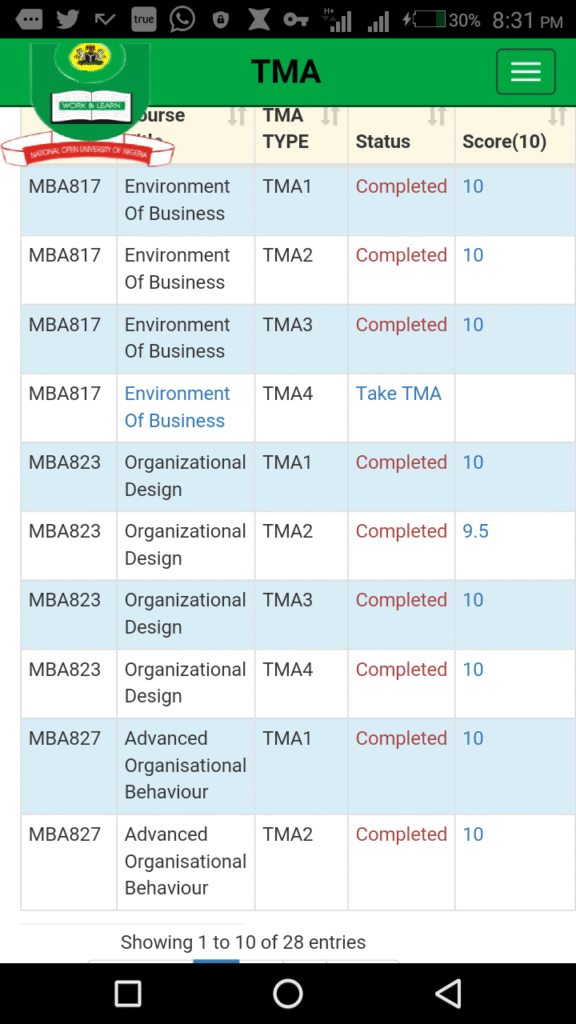
Comprehensive Guide to the NOUN TMA Portal: Login, Submission, and Solutions
For students enrolled in the National Open University of Nigeria (NOUN), the Tutor-Marked Assignment (TMA) portal is one of the most critical platforms for academic success. Because NOUN operates on an Open and Distance Learning (ODL) system, continuous assessment forms a major pillar of your final grades.
This comprehensive guide explains everything you need to know about the NOUN TMA portal, how to log in, steps for submitting your assignments, and how it impacts your cumulative GPA. For additional student support, application guides, and academic updates, you can also explore resources on Student Arrive.
What is NOUN TMA?
Tutor-Marked Assignment (TMA) functions as the continuous assessment or test component for NOUN students.
- Grading Structure: TMAs account for 30% of your total score for any given course, while the end-of-semester examinations account for the remaining 70%.
- Number of Submissions: Typically, students are required to attempt three sets of assignments per course: TMA 1, TMA 2, and TMA 3.
- Scoring Criteria: The system generally aggregates or takes your best scores across the attempts depending on current university guidelines, contributing heavily toward building a safe grade buffer before exams.
Accessing the NOUN TMA Portal
Depending on structural updates by the university administration, NOUN TMAs are primarily accessed via the official learning management and student portals (such as elearn.nou.edu.ng or nouonline.net).
Step-by-Step Login Guide for New and Returning Students
- Navigate to the Portal: Open your web browser and go to the official e-Learning/TMA portal.
- Enter Credentials:
- Username: Your lowercase matriculation number (e.g., nou123456789).
- Password: For first-time logins, your password is usually your lowercase matriculation number or a default preset.
- Change Password: Upon your very first successful login, the system will prompt you to update your password to a secure, personalized one. Ensure you choose something memorable and write it down.
- Accessing Courses: Once logged into your dashboard, navigate to your registered courses for the current semester to view specific TMA modules.
Tip: If you need help navigating general school registration, fee payments, or semester timelines alongside your TMA preparations, check out helpful guides on Student Arrive.
How to Successfully Submit Your TMAs
Submitting your TMAs requires careful timing and compliance with portal rules. Follow these steps to complete your submissions smoothly:
- Complete Course Registration First: Note that your TMA portal will typically only populate courses for which you have successfully completed official course and examination registration for the semester.
- Select the Course: Click on a specific course code from your dashboard list.
- Locate the TMA Section: Scroll down the course page to find the assessment block containing TMA 1, TMA 2, and TMA 3.
- Attempt Sequentially: In most cases, you must open and submit TMA 1 before the system grants you access to TMA 2, and subsequently TMA 3.
- Answer and Submit: Carefully answer the objective or structured questions provided. Review your answers thoroughly before hitting the Submit button. Always confirm that your score reflects immediately on your overview report.
Troubleshooting Common TMA Portal Issues
- “User Not Recognized” Error: This usually happens if you are trying to log in before the portal is officially opened for the semester, or if you haven’t completed your registration. Wait for official announcements confirming the commencement of facilitation and TMA uploads.
- Forgotten Passwords: Use the “Forgot Password” option on the login page. A password reset link will be dispatched to your official NOUN student email address.
- Network Lags and Timeouts: The TMA portal can experience heavy traffic as deadlines approach. It is strongly advised to complete your TMAs early in the semester rather than waiting until the final hours.
Summary Table: Quick Facts
| Feature | Details |
| Portals | nouonline.net / elearn.nou.edu.ng |
| Grade Weight | 30% of total course score |
| Components | TMA 1, TMA 2, and TMA 3 |
| Login ID | Matriculation Number (lowercase) |
| Additional Resources | Student Arrive |
By keeping track of deadlines and ensuring your submissions are done promptly, you set yourself up for an excellent GPA at the National Open University of Nigeria.