


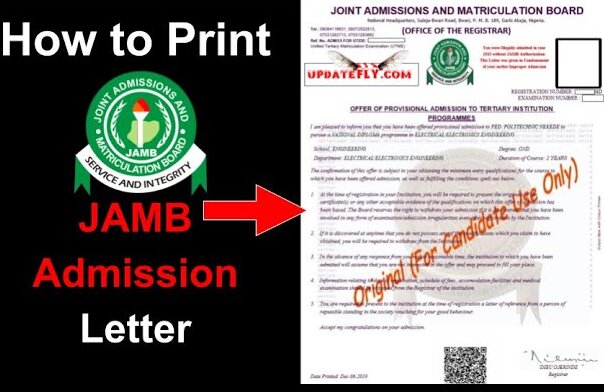
The Ultimate Guide to JAMB Admission Letter for UTME and Direct Entry Candidates
For any Nigerian student seeking tertiary education, getting an offer of admission is an incredibly exciting milestone. However, simply seeing “Admitted” on a university portal or the Joint Admissions and Matriculation Board (JAMB) Central Admissions Processing System (CAPS) isn’t the final step.
To formalize your status as a legally admitted student in any Nigerian university, polytechnic, or college of education, you must possess an official JAMB Admission Letter. Whether you gained entry via the Unified Tertiary Matriculation Examination (UTME) or as a Direct Entry (DE) candidate, this document is your ultimate proof of admission.
This comprehensive guide breaks down everything you need to know about the JAMB Admission letter for both UTME and Direct Entry students, including its importance, how to print it, common issues, and troubleshooting steps.
- Joint Admission and Matriculation Board, JAMB Result 2026: How to Check Online and Offline (SMS)
- 2026 Joint Admissions and Matriculation Board (JAMB) Form › Registration Instructions and Guidelines
- JAMB CBT Software for 2026 UTME Candidates to Get High Score
- JAMB Subject Combinations for UTME & Direct Entry Candidates
- Joint Admissions & Matriculation Board (JAMB) Brochure for 2026/2026 [Latest & Original Version]
- (JAMB) Matriculation List For NYSC Mobilization
What is a JAMB Admission Letter?
The JAMB Admission Letter is an official document issued by the Joint Admissions and Matriculation Board to candidates who have been successfully offered provisional admission into a recognized Nigerian higher institution.
It serves as a formal validation from the federal regulatory body in charge of tertiary admissions, confirming that your admission complies with all set guidelines and quotas. Without this document, your admission is technically considered “informal” or invalid by JAMB standards, which can cause massive roadblocks later in your academic journey.
Why is the JAMB Admission Letter So Important?
Many students make the mistake of ignoring this document once they clear their school’s internal screening. However, the JAMB Admission Letter is required for several critical milestones during and after your studies:
-
Institution Screening and Clearance: Your school’s admissions office will demand a printed copy of this letter during your freshman registration to verify your identity and regularize your file.
-
National Youth Service Corps (NYSC) Mobilization: Upon graduation, you cannot register for the mandatory one-year NYSC scheme without a valid JAMB admission letter. If your name is missing from the JAMB matriculation list due to a missing letter, you will be disqualified from mobilization.
-
Scholarship Applications: Most undergraduate scholarship boards (both government-owned and corporate) require this letter as concrete proof that you are an authentic student of a specific institution.
-
Transfer and Direct Entry Progression: If you ever need to transfer to another institution or use your National Diploma (ND) / IJMB results to apply for Direct Entry later, you must present this letter.
-
Employment and Further Studies: Foreign universities and top-tier employers frequently request your original JAMB admission letter alongside your degree certificate to verify academic authenticity.
- How to Create JAMB Online Profile
- (JAMB) Admission Status Checking Portal for UTME & DE Candidates 2021 & Past Years
- JAMB CBT Centers Approved for 2026 UTME/DE Registration and Other Essential Services in Nigeria and Abroad
- Joint Admissions and Matriculation Board (JAMB) Syllabus for 2026/2026 UTME [Official Version]
Difference Between UTME and Direct Entry (DE) Admission Letters
While both documents serve the exact same legal purpose, they cater to different entry pathways:
| Feature | UTME Admission Letter | Direct Entry (DE) Admission Letter |
| Target Audience | Secondary school leavers entering Year 1 (100 Level). | Diploma, NCE, IJMB, or A-Level holders entering Year 2 (200 Level). |
| Admission Basis | Based on UTME score, O’Level results, and Post-UTME performance. | Based on qualifying higher certificates (ND, HND, NCE) and O’Level verification. |
| Course Duration | Typically covers the full 4 to 5-year curriculum structure. | Reflects a shortened curriculum starting straight from the second year. |
Regardless of your entry method, the portal mechanics, processing fees, and printing steps remain uniform on the JAMB facility.
Prerequisites for Printing Your JAMB Admission Letter
Before you head to a cyber cafe or attempt to download the letter on your device, you must fulfill these prerequisites:
-
Check Admission Status on CAPS: You must ensure that your admission has been processed and approved on the JAMB CAPS portal. Your status must display “Admitted.”
-
Accept the Admission: If your status says “Admission Approved,” you must actively click “Accept Admission” on the CAPS portal. The system will not generate a letter for an unaccepted offer.
-
Active JAMB Profile: You need your registration email and password to log into your e-Facility profile.
-
Processing Fee: JAMB charges a standard fee of ₦1,000 (excluding online processing tokens or cyber cafe service charges) to unlock and print the document.
Step-by-Step Guide: How to Print JAMB Admission Letter (UTME & DE)
Follow these clear, sequential steps to successfully print your original admission letter:
Step 1: Log into the JAMB e-Facility Portal
Open your web browser and navigate to the official portal: https://efacility.jamb.gov.ng/. Enter your registered email address and password to access your unique dashboard.
Step 2: Select the Correct Exam Year
Once your dashboard loads, locate the drop-down menu or sidebar where examination years are listed. Select the exact year you sat for your UTME or registered for your Direct Entry.
Step 3: Access the “Admission Letter” Tab
Scroll through the available service cards on your dashboard and click on the icon labeled “Print Admission Letter”.
Step 4: Complete the Payment
The portal will generate a transaction ID. Review the details carefully and select your preferred payment method (usually Remita). You can pay instantly online using your debit card or print the invoice to pay at a commercial bank branch.
Step 5: Input Registration Number and Print
Once your payment is approved, the portal will redirect you back to the printing page. Enter your JAMB Registration Number in the provided column, select your exam year again, and click on “Print Admission Letter”.
Pro Tip: Always save the document as a PDF on your smartphone, Google Drive, or personal computer before printing a hard copy. This allows you to print extra copies in the future without logging into the portal repeatedly.
Understanding the Contents of the Admission Letter
When your letter downloads, you will notice it actually consists of two distinct pages (often color-coded as green/black or blue/black text):
-
The Institution’s Copy: This page is clearly marked at the top or bottom as the copy meant for your school’s administrative registry.
-
The Candidate’s Copy: This is your personal copy which you must keep safely throughout your academic lifetime.
The letter explicitly outlines your full name, registration number, state of origin, the institution you have been admitted to, your approved faculty and department, and the specific duration of your course.
Common Challenges and How to Fix Them
While the process sounds simple, many UTME and Direct Entry candidates encounter frustrating technical hitches. Here is how to navigate them:
1. “Admission Letter Not Found” or “You Are Not Admitted Yet”
If you receive this error message despite seeing an admission notification on your school’s local portal, it means your school has not updated its admission list with JAMB, or JAMB is still processing your institution’s recommendations.
-
Solution: Keep checking your JAMB CAPS status. Until CAPS updates to “Admitted,” you cannot print the letter.
2. Incorrect Data on the Printed Letter
Sometimes, the printed admission letter might carry an incorrect course of study, an alternative department, or typographical errors in your name.
-
Solution: Do not ignore this. If the course differs from what you are studying, you must apply for a JAMB Change of Course/Correction of Data on the e-Facility portal to align your records before graduation.
3. Payment Deducted But Portal Shows “Unpaid”
This is a common network timeout issue associated with online payment gateways.
-
Solution: Do not make a double payment immediately. Navigate to the “My Payments” tab on your dashboard and click on “Check Status” next to the specific transaction ID. This will force the system to sync with the bank and approve your access.
Frequently Asked Questions (FAQs)
Can I print my JAMB admission letter more than once?
Yes. Once you make the initial ₦1,000 payment for that specific registration number, the portal unlocks permanently, allowing you to log back in and download or reprint the document whenever you want at no extra charge.
Does the JAMB admission letter expire?
No, it does not expire. It remains a permanent part of your academic history and professional profile.
What is the difference between a school admission letter and a JAMB admission letter?
A school admission letter is issued directly by your university or polytechnic to invite you for internal screening. A JAMB admission letter is issued by the national regulatory body. To be a fully validated student, you must have both.
Final Thoughts
Your JAMB Admission Letter is just as important as your final degree certificate. Securing admission via UTME or Direct Entry is a huge win, but failing to secure this regulatory documentation can ground your efforts during mobilization for NYSC or when seeking employment.
Ensure you follow the steps outlined above, safeguard your PDF copy in cloud storage, and double-check that every piece of information matches your school records perfectly. For more detailed guides on navigating your portal, fixing data issues, or tracking your screening processes, feel free to explore additional resources on StudentArrive.
JAMB Admission Letter for UTME and Direct Entry [2026 and Years Downward]
The Joint Admission and Matriculation Board (JAMB) has opened the portal for both Unified Tertiary Matriculation Examination and Direct Entry candidates to access and print their admission letters online.
All the candidates offered admission (2021/2026 downward) can now print their admission letters on JAMB portal after the payment of N1,000 (one thousand naira only) on the website.
How to Print Your JAMB Admission Letter Online
SERVICE FEE › One Thousand Naira Only (N1,000)
You shall be required to create a profile via the Sign Up (New User) Page if you are a new user. To create your profile, you will provide your valid email address, surname, first name, Mobile No, State and LGA of Origin and password, then click on the Sign Up button. Each candidate is entitled to only one profile.
Related Posts: JAMB