
NOUN School Fees Payment Procedure: Step-by-Step Guide for Students
Navigating the financial requirements of the National Open University of Nigeria (NOUN) is a crucial step for both fresh and returning students. Because NOUN operates on an open and distance learning (ODL) system with a semester-based fee structure, understanding how to correctly generate your RRR (Remita Retrieval Reference) and process your payments online or through designated banks is essential to avoid delayed registrations.
In this comprehensive guide, we will walk you through the complete NOUN school fees payment procedure, what you need to budget, and how to successfully complete your transactions on the portal.
Understanding NOUN Fee Structures Before You Pay
Before initiating any transaction on the portal, it helps to know what components make up your bill. Unlike traditional universities that charge sessionally, NOUN fees are paid per semester.
- Compulsory Fees: New undergraduate students typically pay a compulsory fee package (covering registration, library, ICT charges, e-facilitation, etc.) that hovers around ₦36,000, while returning students pay a lower compulsory fee for subsequent semesters. Postgraduate student structures vary slightly.
- Course & Exam Registration Fees: Beyond the compulsory charges, you must pay separately for the specific credit units and examinations you are registering for in that semester (e.g., undergraduate exam fees are generally ₦1,000 per course).
For a complete itemized schedule, check out the detailed breakdown on National Open University of Nigeria (NOUN) School Fees.
Step-by-Step: How to Pay Your NOUN School Fees
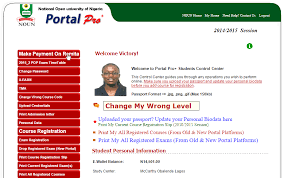
All payments are processed securely through the integrated e-payment platforms (primarily Remita) linked directly to your student portal. Follow these steps to complete your payment:
Step 1: Log Into Your Student Portal
- Open your web browser and navigate to the official NOUN student portal (nouonline.net or the designated student portal page).
- Input your Matriculation Number (or application number for fresh students) and your secure password to log in.
Step 2: Generate Your Remita Retrieval Reference (RRR) Code
- Once logged in, navigate to the “Manage Wallet” or “School Fees” tab on your dashboard navigation menu.
- Select the current semester and session you are paying for.
- Select the specific category of fees you wish to pay (Compulsory fees, course registration fees, or exam fees).
- Verify the total amount displayed.
- Click on “Pay” or “Generate RRR”. A unique Remita Retrieval Reference (RRR) code will be generated for that specific transaction. Make sure to copy or print the RRR invoice slip.
Step 3: Choose Your Preferred Payment Method
You have two primary ways to settle your generated RRR invoice:
- Option A: Online Instant Payment (Recommended)
- Using your debit card (Mastercard, Verve, or Visa), click on the pay-online option directly from the portal interface.
- Enter your card details when redirected to the secure payment gateway.
- Complete the OTP verification sent by your bank. Once successful, your student wallet or portal status updates almost immediately.
- Option B: Bank Branch Payment
- Take your printed RRR invoice slip to any commercial bank branch nationwide that accepts Remita/e-Tranzact payments.
- Inform the teller that you are paying for NOUN school fees via the Remita platform.
- Make the cash deposit and collect your payment receipt, ensuring the teller validates the RRR correctly.
Step 4: Confirm Payment on Your Portal
If you paid via a commercial bank branch, log back into your portal after a few hours to ensure the status has changed from “Pending” to “Paid.” For online card payments, this reflection is instantaneous.
Once your fees are successfully processed, you can proceed to register your courses and examinations for the semester. If you run into issues navigating the portal setup, review the foundational tips provided in How To Register At NOUN University.
Important Tips to Avoid Payment Errors
- Avoid Third-Party Agents: Always generate your RRR codes directly from your personal student portal account. Do not send cash to individuals claiming to help you pay school fees to avoid outright scams or mismatched transaction mapping.
- Print and Save Receipts: Always download or print copies of your transaction receipts and RRR slips. These serve as vital evidence should any administrative discrepancy arise during semester clearance.
- Confirm Course Forms Before Finalizing: Ensure you have correctly selected your courses before paying your course and exam fees, as mistakes can complicate the portal add/drop process.